Canon switched from CR2 to CR3 (Canon Raw 3) in 2018. Since then, CR3 files show as generic icons in KDE's Dolphin file manager, no thumbnails. CR2 files work perfectly. This seems to affect every recent Canon user on KDE, so me and (mostly) Claude Opus 4.6 tried to fix it.
Before finding the real fix, we chased several leads:
MIME magic bytes missing: CR3 had no content-based detection, only filename globs. We added magic bytes (ftypcrx at offset 4) to a local MIME definition. Fixed xdg-mime detection, but thumbnails still didn't appear.
Thumbnailer MIME type mismatch: rawthumbnail.so only listed image/x-dcraw, not image/x-canon-cr3. KF6 doesn't resolve MIME subclass relationships. Adding CR3 to the plugin metadata was necessary, but not sufficient alone.
KDcraw API too old for CR3?: We suspected KDcraw used LibRaw's old unpack_thumb() which might not work for CR3's ISO BMFF container, and that the newer unpack_thumb_ex() was needed. Turned out unpack_thumb() works fine for CR3. KDcraw never even gets that far.
Qt memory allocation limit: Qt's QImageReader has a 256MB limit. Canon R5 RAW decodes to ~267MB. We built a workaround that raised the limit and did full RAW decoding as a fallback. It worked, but was slow, decoding 45 megapixels just to make a thumbnail.
Each of these was a real issue in the pipeline, but none was the actual blocker.
The Final Clue
Renaming a .CR3 file to .CR2 produces an instant thumbnail. Same file contents, different extension, perfect result. That's a suspicious kind of broken.
rawthumbnail.so declares it handles image/x-dcraw. CR3's MIME type image/x-canon-cr3 is a subclass of image/x-dcraw in the system MIME database, but KF6's plugin system doesn't resolve MIME subclass relationships. So the thumbnailer is never invoked for CR3. Fix #1: add image/x-canon-cr3 to rawthumbnail.json.
It checks the file extension against a hardcoded whitelist in rawfiles.h. That list includes *.cr2 and *.crw, but not *.cr3. The function returns false without ever calling LibRaw. LibRaw would have handled it fine.
This is why renaming .CR3 to .CR2 works, it passes the extension check, then LibRaw opens the file by content and extracts the embedded JPEG preview instantly.
The whitelist hasn't been updated since "Version 5" and is missing CR3 along with potentially other newer formats.
The Fix
Two changes needed across two KDE projects:
1. libkdcraw, Add CR3 to the extension whitelist
In src/rawfiles.h, add "*.cr3 " to the raw_file_extentions[] array. That's it. One line.
2. kdegraphics-thumbnailers, Add CR3 MIME type
In raw/rawthumbnail.json, add "image/x-canon-cr3" to the MimeTypes array, because KF6 doesn't resolve MIME subclass hierarchies.
Result
CR3 thumbnails appear instantly in Dolphin, same speed as CR2, because it's extracting an embedded 1620×1080 JPEG preview rather than decoding 45 megapixels of RAW data.
Workaround (until upstream is patched)
For a local fix that doesn't require patching libkdcraw, you can modify rawcreator.cpp in kdegraphics-thumbnailers to call LibRaw directly as a fallback when KDcraw fails. This bypasses the extension whitelist entirely.
CR3 File Format Details
CR2
CR3
Container
TIFF-based
ISO Base Media File Format (like MP4)
Introduced
2004
2018
Magic bytes
49 49 2a 00 + 43 52 02 00
ftypcrx at offset 4
MIME type
image/x-canon-cr2
image/x-canon-cr3
MIME subclass
image/x-dcraw, image/tiff
image/x-dcraw
Embedded previews
Yes (TIFF-accessible)
Yes (ISO BMFF boxes: THMB, PRVW)
LibRaw support
Full
Full (since ~2019)
KDcraw support
Works
Blocked by extension whitelist
Affected Cameras
Every Canon camera since 2018 that shoots CR3:
EOS R, RP, R3, R5, R5 II, R6, R6 II, R7, R8, R10, R50, R100
It seems to me that one of the reasonable paths towards utopia that has merit is humanity leaning strongly towards open-source "free" information technology. That also goes for just information, but that's another story.
After seeing how Veritasium layed out the XZ attack, I got to thinking. I remember the week when CVE-2024-3094 got out, this top of the scale 10/10 CRITICAL. I was shocked how there was no shock in the news.
If this happens in open source, we should expect it happens in closed source, and a lot more of it, viruses and dark stuff loves the .. dark, closed, places.
There are so many steps between committing code and actually getting through testing, rcs, alphas, betas, etc, this is the perfect example of why open source works, because everyone who cares, does care, and some tests will pick up unexpected changes.
Imagine if there was even more incentive for these open-source people to make good code, they (we) care. A lot.
On the other hand, in the closed industry, this may (and) happen all the time, continuously, we just don't know, because we can't know. 🤷 Until of course, 5 or 10 years, after something crazy happens.
Math: patterns Physics: patterns per measurement Chemistry: patterns per bond Biology: patterns per survival Ecology: patterns per system Neuroscience: patterns per substrate per survival Psychology: patterns per context per consciousness Sociology: patterns per context per consciousness per collective Philosophy: patterns?
I have a small bash script that opens one of my dev environments; Dolphin on my project assets, Unity Hub, VS Code, and a Konsole in the project directory. It works, but two things always annoyed me:
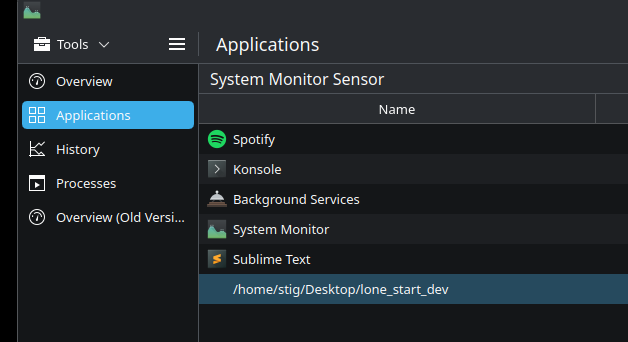
The script lingers in System Monitor as a phantom process doing nothing, with no visible window.
Dolphin opens as "dolphin" (lowercase, no icon) instead of "Dolphin" with its proper icon, like it would from the KDE start menu. I wondered why.
Time for some Claude Code. Fixing this turned out to be a deep dive into how KDE Plasma actually launches applications.
Simple enough. kstart is a KDE utility for launching windowed apps. But it's a holdover from Plasma 5 that doesn't integrate with the way Plasma 6 tracks applications.
This fixed the Dolphin icon issue (the app now sets its own _KDE_NET_WM_DESKTOP_FILE window property), but the apps vanished entirely from System Monitor's Applications tab. The script itself still lingered.
The problem: KDE System Monitor's "Applications" view doesn't use window properties. It uses systemd cgroups.
How KDE tracks applications
When you launch an app from KDE's start menu or KRunner, the launcher doesn't just fork a process. It creates a systemd scope; a named cgroup container; following a specific naming convention:
KDE System Monitor (specifically libksysguard) parses these scope names with a regex to extract the desktop file ID, then looks up the .desktop file to get the app name and icon. No scope, no entry in the Applications tab.
This seemed right, but systemd-run --scope acts as the scope lifecycle manager; it blocks, keeping the scope alive as long as the app runs. Only Dolphin would open; the script would hang on line 1 waiting for Dolphin to exit. Running the script a second time would open the remaining three apps (because Dolphin, a single-instance app, would return immediately).
Worse: when I killed the lingering script from System Monitor, it took Unity Hub down with it; because killing the systemd-run process tears down the scope.
After attempt 2: apps show correctly, but the script still lingers and is entangled with the app processes.
The solution: D-Bus scope creation
Looking at how KDE's own launcher works (in KIO::ScopedProcessRunner), the actual mechanism is:
Start the process normally (fork)
Call systemd's StartTransientUnit over D-Bus to create a scope
Pass the PID to move it into the new scope
The scope is created by systemd and persists independently; no lifecycle manager needed. We can do the same from bash with busctl:
Calls StartTransientUnit via D-Bus, creating a scope named app-<desktop-id>-<pid>.scope and moving the process into it
Disowns the process from the shell
Each app now lives in its own cgroup scope. The script's cgroup becomes empty when it exits, so it vanishes from System Monitor. All apps show up with proper names and icons.
After the fix: all apps appear correctly in KDE System Monitor, and the script is gone.
A nice side effect: re-running the script doesn't re-open single-instance apps (like Dolphin), while Konsole opens a new window each time; which is exactly the behaviour I wanted.
Verifying against KDE source
To make sure this approach is stable and won't need migrating, I checked the actual KDE source code.
KIO's ScopedProcessRunner (scopedprocessrunner.cpp) does the same thing: fork the process, then call StartTransientUnit with the PIDs property. KDE uses a UUID for the scope suffix instead of PID, and sets three additional properties:
Property
Value
Purpose
PIDs
Process ID
Move process into scope
Slice
app.slice
Proper cgroup hierarchy
Description
App name
Human-readable in systemctl
SourcePath
Path to .desktop file
Fallback for desktop file lookup
libksysguard's cgroup.cpp parses the scope name with this regex:
It extracts the desktop file ID from between app- and -<suffix>.scope, then calls KService::serviceByMenuId() to find the .desktop file. This is why the naming convention matters; use the desktop file's stem (e.g., org.kde.dolphin) as the ID.
Interesting note: on systemd ≥ 250, KDE internally prefers launching apps as transient services (where systemd itself forks the process). But scopes remain the correct mechanism for external launchers that start the process themselves; exactly our case. This is standardized in the systemd XDG desktop specification and isn't going anywhere.
Why is this so hard?
KDE has a clean C++ API for this; KIO::ApplicationLauncherJob is essentially a one-liner that handles scope creation, desktop file lookup, and process management. But no CLI tool exposes it properly:
kioclient exec launches .desktop files but doesn't accept app arguments (no --workdir, no directory to open)
kstart is a Plasma 5 holdover that doesn't create scopes
systemd-run --scope blocks as a lifecycle manager
gtk-launch doesn't create KDE-style scopes
There's a missing CLI tool in the KDE ecosystem; something like klaunch org.kde.dolphin /some/path that does what the start menu does. Until that exists, the busctl + StartTransientUnit approach is the way to go.