
Launching Apps from a Bash Script the Way(land) KDE Does
I have a small bash script that opens one of my dev environments; Dolphin on my project assets, Unity Hub, VS Code, and a Konsole in the project directory. It works, but two things always annoyed me:
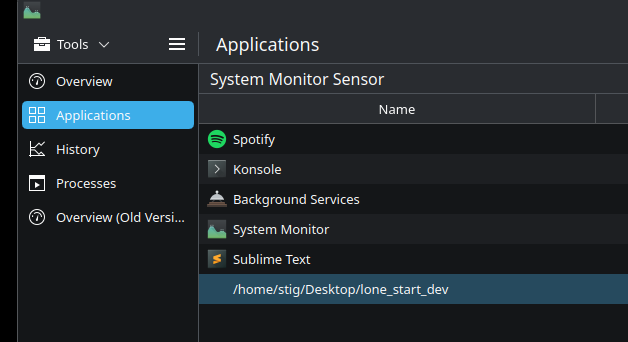
- The script lingers in System Monitor as a phantom process doing nothing, with no visible window.
- Dolphin opens as "dolphin" (lowercase, no icon) instead of "Dolphin" with its proper icon, like it would from the KDE start menu. I wondered why.
Time for some Claude Code. Fixing this turned out to be a deep dive into how KDE Plasma actually launches applications.
The original script
#!/bin/bash
PPATH=/home/stig/Projects/Lone/Lone
kstart dolphin "$PPATH/Assets" &
kstart /opt/unityhub/unityhub &
kstart code $PPATH &
konsole --workdir="$PPATH" &
Simple enough. kstart is a KDE utility for launching windowed apps. But it's a holdover from Plasma 5 that doesn't integrate with the way Plasma 6 tracks applications.
Attempt 1: Just drop kstart
#!/bin/bash
PPATH=/home/stig/Projects/Lone/Lone

dolphin "$PPATH/Assets" &>/dev/null &
/opt/unityhub/unityhub &>/dev/null &
code "$PPATH" &>/dev/null &
konsole --workdir="$PPATH" &>/dev/null &

disown -a
This fixed the Dolphin icon issue (the app now sets its own _KDE_NET_WM_DESKTOP_FILE window property), but the apps vanished entirely from System Monitor's Applications tab. The script itself still lingered.
The problem: KDE System Monitor's "Applications" view doesn't use window properties. It uses systemd cgroups.
How KDE tracks applications
When you launch an app from KDE's start menu or KRunner, the launcher doesn't just fork a process. It creates a systemd scope; a named cgroup container; following a specific naming convention:
app-org.kde.dolphin-72323.scope
app-org.kde.konsole-81510.scope
You can see your active scopes with:
systemctl --user list-units --type=scope 'app-*'KDE System Monitor (specifically libksysguard) parses these scope names with a regex to extract the desktop file ID, then looks up the .desktop file to get the app name and icon. No scope, no entry in the Applications tab.
Attempt 2: systemd-run --scope
#!/bin/bash
PPATH=/home/stig/Projects/Lone/Lone

systemd-run --user --scope -d --unit="app-org.kde.dolphin-$RANDOM.scope" \
    -- dolphin "$PPATH/Assets" 2>/dev/null
systemd-run --user --scope -d --unit="app-unityhub-$RANDOM.scope" \
    -- /opt/unityhub/unityhub 2>/dev/null
systemd-run --user --scope -d --unit="app-code-$RANDOM.scope" \
    -- code "$PPATH" 2>/dev/null
systemd-run --user --scope -d --unit="app-org.kde.konsole-$RANDOM.scope" \
    -- konsole --workdir="$PPATH" 2>/dev/null
This seemed right, but systemd-run --scope acts as the scope lifecycle manager; it blocks, keeping the scope alive as long as the app runs. Only Dolphin would open; the script would hang on line 1 waiting for Dolphin to exit. Running the script a second time would open the remaining three apps (because Dolphin, a single-instance app, would return immediately).
Worse: when I killed the lingering script from System Monitor, it took Unity Hub down with it; because killing the systemd-run process tears down the scope.
The solution: D-Bus scope creation
Looking at how KDE's own launcher works (in KIO::ScopedProcessRunner), the actual mechanism is:
- Start the process normally (fork)
- Call systemd's
StartTransientUnitover D-Bus to create a scope - Pass the PID to move it into the new scope
The scope is created by systemd and persists independently; no lifecycle manager needed. We can do the same from bash with busctl:
#!/bin/bash
PPATH=/home/stig/Projects/Lone/Lone

launch() {
    local id="$1"
    shift
    "$@" &>/dev/null &
    local pid=$!
    busctl call --user org.freedesktop.systemd1 /org/freedesktop/systemd1 \
        org.freedesktop.systemd1.Manager StartTransientUnit \
        'ssa(sv)a(sa(sv))' \
        "app-${id}-${pid}.scope" "fail" \
        1 "PIDs" "au" 1 "$pid" \
        0 &>/dev/null
    disown "$pid" 2>/dev/null
}

launch org.kde.dolphin dolphin "$PPATH"
launch unityhub /opt/unityhub/unityhub
launch code code "$PPATH"
launch org.kde.konsole konsole --workdir="$PPATH"
The launch function:
- Starts the app in the background
- Captures its PID
- Calls
StartTransientUnitvia D-Bus, creating a scope namedapp-<desktop-id>-<pid>.scopeand moving the process into it - Disowns the process from the shell
Each app now lives in its own cgroup scope. The script's cgroup becomes empty when it exits, so it vanishes from System Monitor. All apps show up with proper names and icons.
After the fix: all apps appear correctly in KDE System Monitor, and the script is gone.
A nice side effect: re-running the script doesn't re-open single-instance apps (like Dolphin), while Konsole opens a new window each time; which is exactly the behaviour I wanted.
Verifying against KDE source
To make sure this approach is stable and won't need migrating, I checked the actual KDE source code.
KIO's ScopedProcessRunner (scopedprocessrunner.cpp) does the same thing: fork the process, then call StartTransientUnit with the PIDs property. KDE uses a UUID for the scope suffix instead of PID, and sets three additional properties:
| Property | Value | Purpose |
|---|---|---|
PIDs | Process ID | Move process into scope |
Slice | app.slice | Proper cgroup hierarchy |
Description | App name | Human-readable in systemctl |
SourcePath | Path to .desktop file | Fallback for desktop file lookup |
libksysguard's cgroup.cpp parses the scope name with this regex:
(apps|app|flatpak|dbus)-(?:[^-]*-)?([^-]+(?=-.*\.scope)|[^@]+(?=(?:@.*)?\\.service|.slice))It extracts the desktop file ID from between app- and -<suffix>.scope, then calls KService::serviceByMenuId() to find the .desktop file. This is why the naming convention matters; use the desktop file's stem (e.g., org.kde.dolphin) as the ID.
Interesting note: on systemd ≥ 250, KDE internally prefers launching apps as transient services (where systemd itself forks the process). But scopes remain the correct mechanism for external launchers that start the process themselves; exactly our case. This is standardized in the systemd XDG desktop specification and isn't going anywhere.
Why is this so hard?
KDE has a clean C++ API for this; KIO::ApplicationLauncherJob is essentially a one-liner that handles scope creation, desktop file lookup, and process management. But no CLI tool exposes it properly:
kioclient execlaunches .desktop files but doesn't accept app arguments (no--workdir, no directory to open)kstartis a Plasma 5 holdover that doesn't create scopessystemd-run --scopeblocks as a lifecycle managergtk-launchdoesn't create KDE-style scopes
There's a missing CLI tool in the KDE ecosystem; something like klaunch org.kde.dolphin /some/path that does what the start menu does. Until that exists, the busctl + StartTransientUnit approach is the way to go.
Environment
| OS | Kubuntu 25.10 (Questing Quokka) |
| KDE Plasma | 6.4.5 |
| systemd | 257 |
| Display server | Wayland (KWin) |